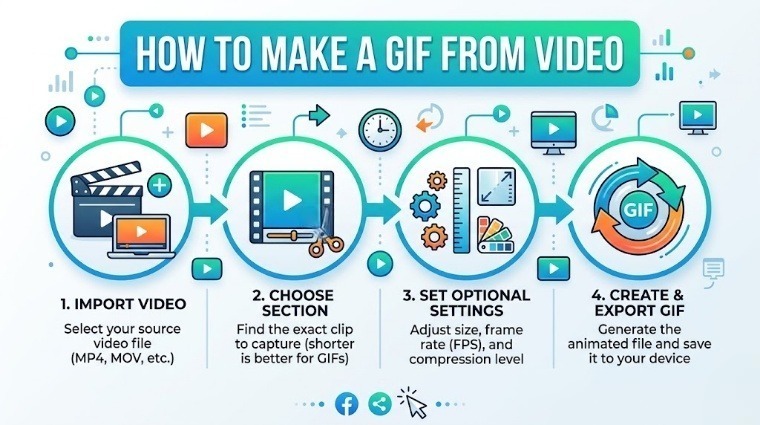
GIFs are everywhere — in chat messages, social media posts, blog articles, and marketing emails. But creating one doesn't require complicated software. With free online tools, you can make a high-quality animated GIF from a video clip or a series of photos in under a minute.
Two Ways to Make a GIF
- Video to GIF — Convert a short MP4 video clip into an animated GIF
- Image to GIF — Animate a still photo with Ken Burns, zoom, pan, or fade effects
Method 1: Convert Video (MP4) to GIF
This is the most common use case. You have a short video clip and want to turn it into a looping GIF for sharing.
Step 1: Go to ipixlab.com/video-to-gif/
Step 2: Upload your MP4, MOV, or WEBM video file.
Step 3: Trim the clip, set the frame rate (FPS), and click Generate GIF.
Step 4: Download your GIF instantly — no watermark.
Method 2: Animate a Photo (Image to GIF)
Turn any still photo into an animated GIF using motion effects. Perfect for creating eye-catching social media content.
Step 1: Open ipixlab.com/gif/ and upload a JPG or PNG photo.
Step 2: Choose an animation effect: Zoom In, Pan Left/Right, Ken Burns, Fade In/Out.
Step 3: Download your animated GIF.
GIF Settings: What They Mean
| Setting | Recommended | Effect |
|---|---|---|
| FPS (Frames per second) | 10–15 FPS | Smooth motion, manageable file size |
| FPS too high | 30+ FPS | Very large GIF file size |
| Duration | 2–6 seconds | Short GIFs loop better |
| Width | 480–640px | Good quality without huge files |
How to Reduce GIF File Size
GIF files can get large quickly. Here are practical ways to keep them small:
- Keep clips under 5 seconds
- Use 10–12 FPS instead of 24–30 FPS
- Reduce the width to 480px or less
- Avoid GIFs with complex textures — they compress poorly
- Use fewer colors (256 colors max is the GIF standard)
GIFs with many colors and fine details can easily reach 10–20MB. For web use, aim to keep your GIF under 2MB. If you need better compression with animation, consider using WEBP animated format instead.
Where to Use GIFs
- WhatsApp and Telegram chats — great for reactions
- Twitter / X posts — GIFs auto-play without sound
- Blog articles — illustrate a process or show a before/after
- Email newsletters — GIFs animate in most email clients
- Product pages — show a product from multiple angles
"A well-made GIF communicates more than a paragraph of text — and it loads in every browser without a video player."
Quick Checklist
- ✅ Keep your GIF under 5 seconds for best looping effect
- ✅ Use 10–15 FPS for smooth but compact files
- ✅ Target under 2MB for fast web loading
- ✅ Test the GIF loop before sharing
- ✅ For transparent GIFs, use PNG source images