or browse to upload · PDF only · Files never uploaded to server
Tips
Remove Blank Pages
Scanned documents often have blank pages. Use the visual thumbnails to quickly identify and select all blank pages, then delete them in one click.
Use Range Input
For large PDFs, type the page range instead of clicking each thumbnail. Enter "1-5, 8, 11-15" to select those exact pages for deletion quickly.
Keep What You Need
Not sure what to delete? Use "Select All" then deselect the pages you want to keep. This is faster when you want to keep only a few pages from a long PDF.
Free Online PDF Page Remover — No Signup Required
iPixLab.com's PDF page deletion tool lets you remove unwanted pages from any PDF file directly in your browser. No software to install, no account to create, and no files ever uploaded to a server. Everything runs locally using the pdf-lib JavaScript library — your documents stay completely private on your device.
When Do You Need to Delete PDF Pages?
- Remove blank pages from scanned docs
- Delete cover pages before sharing
- Remove confidential pages
- Clean up merged PDF documents
- Remove duplicate or error pages
- Trim unnecessary appendices
How to Delete Pages from a PDF Online
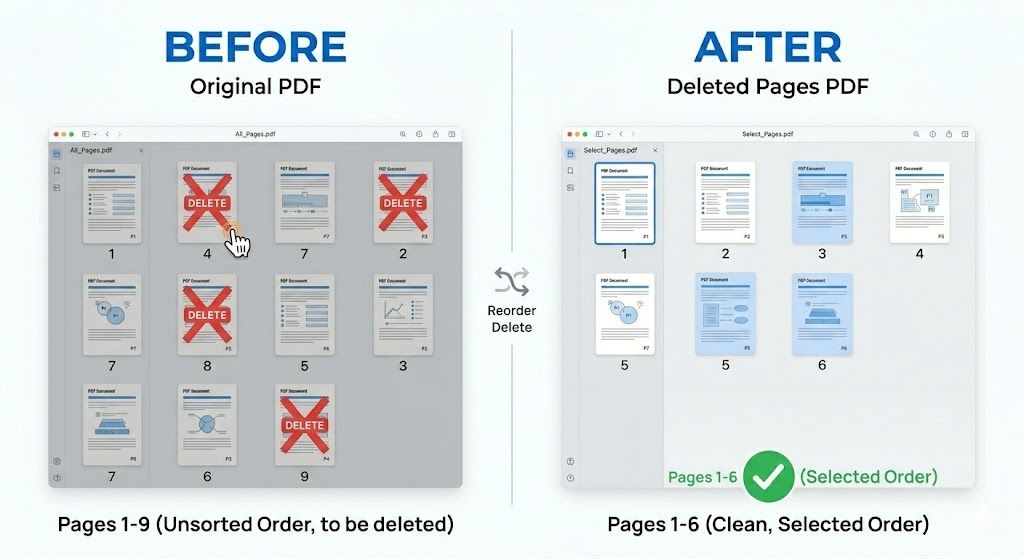
Upload your PDF and all pages appear as visual thumbnails. Click on any page to select it for deletion — selected pages are highlighted in red with a "DELETE" overlay so you always know what will be removed. You can also use the range input for fast selection. When ready, click "Delete Selected Pages" to generate and download your new PDF instantly.
Does Deleting Pages Reduce Quality?
No. Deleting pages only removes them from the document structure. The remaining pages keep their original quality, fonts, images, vector graphics, and all formatting completely intact. No re-encoding or compression happens during the process.
100% Private — Files Never Leave Your Device
Unlike most online PDF tools that upload your files to cloud servers, iPixLab processes everything locally in your browser using the pdf-lib JavaScript library. Your documents are never sent to any server — no privacy risk, no data storage, and no retention. Works on any device including iPhone, Android, Windows, and Mac.