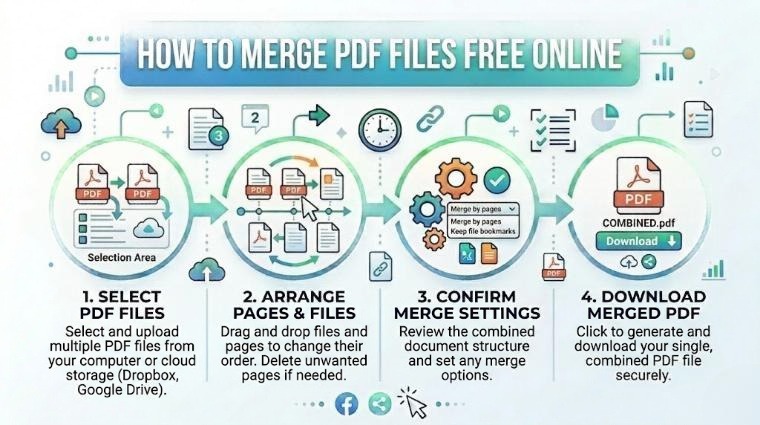
Merging PDF files is one of the most common document tasks in offices, schools, and everyday life. Whether you want to combine a cover letter with your resume, merge multiple invoices, or bundle several reports into one file, this guide shows you the fastest way to do it — completely free, without installing any software.
Why Merge PDF Files?
- Send multiple documents as a single attachment
- Combine chapters or sections of a report into one file
- Merge a cover letter and resume for job applications
- Bundle invoices, receipts, or contracts for record-keeping
- Reduce email clutter — one PDF instead of many attachments
How to Merge PDFs on iPixLab (Free, 3 Steps)
How Many PDFs Can I Merge?
iPixLab's Merge PDF tool supports combining unlimited PDF files in a single session. Whether you have 2 files or 20 files, the process is the same — upload, arrange, merge.
Comparing PDF Merge Methods
| Method | Cost | Speed | Works On |
|---|---|---|---|
| iPixLab Merge PDF | Free | Instant | Any device |
| Adobe Acrobat | Paid ($20/mo) | Fast | Windows, Mac |
| Preview (Mac) | Free | Medium | Mac only |
| Microsoft Word | Paid | Slow | Windows, Mac |
| Google Drive | Free | Complex | Any device |
How to Merge PDFs on Mac (Without Software)
Mac users can use the built-in Preview app to merge PDFs. Open the first PDF in Preview → View → Thumbnails → Drag the second PDF's pages into the thumbnail panel → File → Export as PDF. This works but is slower than using an online tool, especially for many files.
How to Merge PDFs on Windows (Without Software)
Windows does not have a built-in PDF merge feature. The easiest option is to use iPixLab's free online tool — it works in any browser including Edge and Chrome, with no download required.
Other Useful PDF Tools
- Split PDF — Break a large PDF into individual pages or sections
- Compress PDF — Reduce PDF file size before emailing
- Protect PDF — Add a password to your PDF document
- Sign PDF — Add your digital signature to any PDF
- PDF to JPG — Convert each PDF page to an image
"Merging PDFs used to require expensive software. Today, a free browser-based tool can do it in under 10 seconds."
Quick Checklist
- ✅ Arrange files in the correct order before merging
- ✅ Check that all PDFs are not password protected before merging
- ✅ Compress the merged PDF if file size is too large
- ✅ Verify the final PDF opens correctly on all pages
- ✅ Your files stay private — processed in your browser only